ALCMS Database Server
The central, high‑performance data repository for the Airfield Lighting Control and Monitoring System. The ALCMS Database Server stores all configuration data, real‑time status information, historical event logs, alarm histories, and operational parameters, providing a secure, scalable, and highly available foundation for AGL system management, reporting, and analytics.
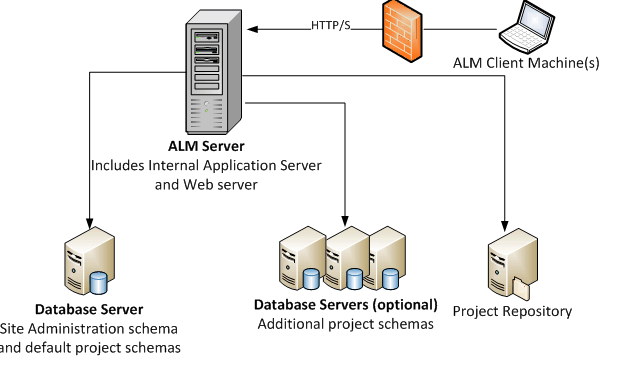
Image disclaimer: For identification and illustration only. It may show a product by another manufacturer and may not depict the exact item described; it is not a statement of any product’s quality, approval or performance. Third-party image and trademark rights belong to their owners. See full notice.
What Is It?
The ALCMS Database Server is the core data management component of the Airfield Lighting Control and Monitoring System. It is a purpose‑built database system (typically SQL or time‑series based) that serves as the single source of truth for all AGL operational data. The Database Server stores and manages everything from static configuration data (airfield layout, circuit mappings, equipment inventory) to dynamic operational data (real‑time status, alarms, event logs, and operator actions), providing the data backbone for the entire ALCMS ecosystem.
Key characteristics of the ALCMS Database Server include:
- Centralised Data Repository: Consolidates all AGL data — configuration, real‑time status, historical events, alarms, operator logs, and maintenance records — into a single, consistent database.
- High Availability & Redundancy: Deployed in active‑passive or active‑active clustering configurations with automatic failover, ensuring continuous data access even during server failures.
- Scalable Performance: Optimised for high‑throughput write operations (thousands of events per second) and fast query responses (milliseconds), supporting large airfields with thousands of light fixtures and sensors.
- Data Integrity & Security: Implements robust transaction management, ACID compliance, encryption at rest, and role‑based access control to protect sensitive operational data.
- Comprehensive Data Model: Supports the full AGL data model — including circuits, CCRs, light fixtures, transformers, alarms, events, users, and maintenance activities — with relationships and metadata.
- Built‑in Archiving & Retention: Includes automated data archiving and purging policies to manage storage growth while preserving historical data for regulatory compliance.
- Integration APIs: Provides standard interfaces (SQL, ODBC, JDBC, REST API, OPC UA) for seamless integration with ALCMS workstations, SCADA systems, and enterprise asset management (EAM) platforms.
The ALCMS Database Server is typically deployed as a dedicated physical server or virtual machine in the airfield's control centre or data centre. It is the foundation upon which all ALCMS functionalities — monitoring, control, reporting, and analytics — are built. Its reliability, performance, and security are critical to the safe and efficient operation of the airfield lighting system.
Purpose & Function
The database server's purpose is to make sure every part of the ALCMS — every workstation, every operator, every report — is working from the same set of facts. Without a single authoritative store, it becomes possible for one screen to show a fixture as healthy while another still reflects a fault that was actually cleared minutes ago, which is exactly the kind of inconsistency that erodes an operator's confidence in what they're looking at during an active event. High availability and clustering matter for the same underlying reason: this database isn't just holding data, it is effectively the system's memory of the entire airfield's lighting state and history, and losing access to it — even briefly — means losing the ability to reliably monitor, control, or later account for what happened, not just losing one server's worth of information.
Where Is It Used?
The ALCMS Database Server is deployed in every airfield with a modern AGL control and monitoring system, serving as the backbone for all data‑driven operations. Key applications include:
- ALCMS Core Infrastructure: Providing the data persistence layer for the ALCMS server, workstations, and operator consoles, ensuring that all status information, alarms, and commands are stored reliably.
- Real‑Time Status Management: Maintaining up‑to‑date status of every circuit, CCR, light fixture, and sensor, enabling the ALCMS to display current operational states to operators.
- Event & Alarm Logging: Storing all system events, alarm activations, and operator actions with precise timestamps, providing a complete audit trail for incident investigation and compliance.
- Configuration Management: Storing and version‑controlling all system configurations — including circuit assignments, brightness step mappings, alarm thresholds, and user permissions.
- Reporting & Analytics: Providing the data foundation for generating operational reports, maintenance dashboards, performance trends, and predictive analytics.
- SCADA & Enterprise Integration: Serving as the data interface for integration with airport‑wide SCADA systems, enterprise asset management (EAM) systems, and business intelligence platforms.
- Regulatory Compliance: Providing the data retention and audit capabilities required by FAA, ICAO, and other regulatory bodies for AGL system records.
- Maintenance & Asset Management: Tracking maintenance history, equipment lifecycles, and repair records to support predictive and preventive maintenance programs.
Installation & Location
The database server is installed as a rack-mounted physical server or virtual machine in the airfield's main control centre or data centre, in a climate-controlled room alongside the ALCMS application server and core network equipment rather than out at any field location. Where high availability is specified, a second server is installed in a physically separate room, building, or site, connected by a dedicated replication link so that a fire, flood, or power event affecting one location cannot take down both database instances at once. Power is drawn from a UPS-protected, and ideally dual-fed, circuit, since an uncontrolled shutdown during a write operation risks database corruption rather than a mere loss of connectivity. Storage is sized and configured (RAID, SSD tiering) for the sustained high-throughput write load of continuous event logging, and the server's network connection ties into the same redundant core switching used by the rest of the ALCMS infrastructure so database access does not depend on a single network path.
How Does It Work?
The ALCMS Database Server operates as a high‑performance data management engine, handling both real‑time operational data and historical records. Key functional aspects include:
- Data Ingestion: The database receives data from multiple sources — the ALCMS server (which aggregates data from field devices), operator workstations (for configuration changes and commands), and external systems (SCADA, maintenance). Data is ingested via APIs, SQL statements, or message queues (e.g., MQTT, AMQP).
- Data Storage & Indexing: The database stores data in optimised tables or collections. For high‑volume time‑series data (events, alarms, status changes), a time‑series database engine (e.g., TimescaleDB, InfluxDB) may be used. Indexes are created on key fields (timestamp, device ID, event type) to support fast queries.
- Real‑Time Data Access: The database provides low‑latency access to real‑time data (current status, active alarms) via in‑memory caches or materialised views. This ensures that operators see near‑instantaneous updates on their consoles.
- Historical Query & Retrieval: For historical analysis, the database supports complex queries with time‑range filters, aggregations, and joins across multiple tables. Query performance is optimised through partitioning (by date), compression, and summarisation (pre‑aggregated views).
- Transaction Management: All write operations are wrapped in ACID transactions to ensure data consistency. This is critical for configuration changes and command execution, where partial updates could lead to inconsistent system states.
- Data Security & Access Control: The database enforces role‑based access control (RBAC) at the table, row, and column levels. All access attempts are logged for security auditing. Data at rest is encrypted using industry‑standard encryption (AES‑256).
- Backup & Recovery: Automated full and incremental backups are performed regularly. Point‑in‑time recovery capabilities allow restoration to any previous state, protecting against data corruption or accidental deletion.
- High Availability & Failover: In critical installations, the database is deployed in a cluster with automatic failover. The active node handles all read/write operations, while the passive node replicates data and takes over seamlessly in the event of a failure.
- Data Archiving & Retention: Configurable retention policies automatically archive or purge old data. For example, detailed event logs may be retained for 90 days, while aggregated summaries are kept for 10 years. Archived data can be moved to cheaper storage (tape, cloud) for long‑term preservation.
The Database Server is maintained by system administrators and database specialists. It is monitored continuously for performance, storage capacity, and health, with alerts generated for any anomalies. Regular maintenance tasks — such as reindexing, vacuuming, and statistics updates — are scheduled to ensure optimal performance.
Data Flow Architecture & Control Logic
Multiple sources in, dual access paths out, protected throughout
ALCMS Server
Aggregated field-device data
Operator Workstations
Configuration & commands
External Systems
SCADA, maintenance feeds
Ingestion via API / SQL / Message Queue
MQTT, AMQP, or direct statements bring data into the engine
Storage & Indexing
Relational tables plus time-series engine, indexed on timestamp, device ID, event type
In-memory cache / materialised views for near-instant operator updates
Partitioned, compressed tables for time-range analysis and reporting
Protected Throughout
ACID transactions, role-based access & AES-256 encryption, automated backup, active-passive failover
Physical Construction
The database server is built in a standard 19-inch rack-mount chassis, sized to the storage capacity required (typically 2U to 4U), with front-accessible hot-swap drive bays arranged in a RAID 10 array so any single drive can fail — or multiple drives, provided no two failed drives belong to the same mirrored pair — without interrupting data availability. Dual hot-swappable power supplies at the rear are fed from independent circuits so either can be pulled and replaced without powering down the server, and high-speed NVMe SSDs are used for the active database tier while larger-capacity HDDs handle long-term archive storage within the same chassis or an attached storage shelf. Dual 10 GbE network interfaces, optionally backed by fibre SFP modules, are mounted on expansion cards secured to the chassis rail system, keeping the high-throughput data path independent of the server's management network connection. The unit is designed to sit in a temperature- and humidity-controlled server room or data-centre rack, with a lockable front bezel restricting physical access to drive bays and power controls, and where clustering is used for high availability, the standby server is installed in a physically separate rack or room so a single point of failure cannot take out both nodes.
Technical Parameters
| Parameter | Typical Value |
|---|---|
| Database Type | Relational (PostgreSQL, MS SQL) + Time‑Series (TimescaleDB, InfluxDB) hybrid |
| Data Model | Normalised relational schema + time‑series tables for events/alarms |
| Write Throughput | 10,000‑50,000 events/second (with time‑series optimisations) |
| Read Throughput | 5,000‑20,000 queries/second (with caching and indexing) |
| Storage Capacity | 1‑20 TB (configurable, based on retention and event volume) |
| Retention Policy | Configurable: detailed logs 30‑365 days, summaries 5‑10 years |
| High Availability | Active‑passive or active‑active clustering with automatic failover (< 30 seconds) |
| Backup | Automated full/incremental backups to local and off‑site storage |
| Point‑in‑Time Recovery | Supported (WAL archiving) |
| Encryption | AES‑256 (data at rest), TLS 1.2+ (data in transit) |
| Access Control | Role‑based (RBAC) with table/row/column‑level permissions |
| Interfaces | ODBC, JDBC, REST API, OPC UA, SQL (native) |
| Replication | Synchronous or asynchronous replication to secondary site |
| Platform | Windows Server (x64), Red Hat Enterprise Linux, Ubuntu LTS |
| Processor | 8‑16 cores (minimum), 32+ cores for high throughput |
| Memory (RAM) | 32‑128 GB (minimum), 256+ GB for large installations |
| Storage Type | NVMe SSD (data), HDD (archive), RAID 10 recommended |
| Network Interface | 2 x 10 GbE (redundant), optional fibre SFP |
| Power Supply | Dual redundant, hot‑swappable (120/230 VAC) |
| Operating Temperature | 10°C to 40°C (server room environment) |
| Certifications | CE, FCC, UL, IEC 61000‑6‑2 (EMC immunity), FAA AC 150/5345‑56 |
Electrical Requirements
| Requirement | Typical Value |
|---|---|
| Supply Voltage | Dual redundant, hot-swappable, 120/230 VAC |
| Backup Power | UPS-backed with automatic failover; server-room standby generator recommended |
| Network Wiring | 2 x 10 GbE (redundant, structured cabling), optional fibre SFP |
| Earthing/Grounding | Rack and chassis bonded to server-room earth per local electrical code |
| Fault Protection | Redundant PSU with automatic failover; UPS transfer and mains-loss monitoring |
| Power Source | Facility mains, conditioned and UPS-backed per data-centre practice |
Applicable Standards
FAA AC 150/5345‑56
Specification for AGL control and monitoring equipment — data management and logging requirements
ICAO Annex 14
Requirements for AGL system data retention and record keeping
IEC 62443
Security for industrial automation and control systems — applicable to ALCMS database server cybersecurity and access control
NIST SP 800‑53
Security and privacy controls — data protection and audit requirements
ISO/IEC 27001
Information security management — data security best practices
Installation Requirements
Server Room Environment
CivilSite the server in a temperature- and humidity-controlled server room or data-centre rack within its rated operating range, with a lockable front bezel restricting physical access to drive bays and power controls.
Rack Mounting & Airflow
MechanicalMount the chassis in the rack rail system with clear front and rear airflow, and where clustering is used, install the standby node in a physically separate rack or room so a single point of failure cannot take out both.
Dual Power Feed
ElectricalFeed the dual hot-swappable power supplies from independent circuits so either can be pulled and replaced without powering down the server.
Redundant Network Interfaces
ElectricalTerminate the dual 10 GbE (or fibre SFP) interfaces to separate switches on the high-throughput data path, keeping it independent of the server's management network connection.
RAID & Storage Configuration
ConfigurationConfigure the drive bays as RAID 10 before schema deployment, with NVMe SSDs assigned to the active database tier and HDDs to archive storage, so a failure of any single drive — or of multiple drives, as long as none share the same mirrored pair — never interrupts data availability.
Encryption & Access Control Setup
ConfigurationEnable AES-256 encryption at rest and TLS 1.2+ in transit, and configure role-based access control before any live AGL data is written to the database.
Pre-Go-Live Sign-off
DocumentationRecord rack location, power/network feed routing, RAID configuration, and security settings as-built before the server is placed into service.
Testing & Commissioning
Schema & Data Model Verification
Pre-Go-LiveConfirm the relational and time-series schema correctly represents every AGL subsystem's tags, events, and alarm structures.
Write/Read Throughput Test
Final AcceptanceLoad-test the database under simulated peak event volume to confirm write and read throughput meet the specified rates.
Failover Test
Final AcceptanceForce a failover between clustered nodes and confirm automatic recovery completes within the specified time without data loss.
Backup & Point-in-Time Recovery Test
Final AcceptanceRun a full restore from backup and a point-in-time recovery using WAL archiving to confirm both procedures work as designed.
Retention Policy Verification
Final AcceptanceConfirm detailed logs and summarised data are retained and purged according to the configured retention schedule.
Encryption & Access Control Test
Final AcceptanceVerify data-at-rest and in-transit encryption are active and that role-based access control correctly restricts database access.
Documentation & As-Built Sign-off
Final AcceptanceRecord schema version, throughput test results, and failover/backup verification in the commissioning dossier for handover.
Inspection & Maintenance
Backup & Restore Verification
QuarterlyPerform a test restore from a recent backup to confirm the backup chain and point-in-time recovery (WAL archiving) are actually usable, not just running.
Failover Test
AnnualTrigger a controlled failover between active and passive nodes to confirm the cluster switches within the specified <30 second window.
Storage Capacity & Retention Review
QuarterlyCheck storage utilisation against retention policy so detailed logs and summaries don't approach capacity limits unexpectedly.
Access Control & Security Audit
AnnualReview role-based access permissions and encryption configuration (AES-256 at rest, TLS in transit) against ISO/IEC 27001 and NIST SP 800-53 requirements.
Replication Health Check
Semi-annualVerify synchronous or asynchronous replication to the secondary site is current and lag-free, since a stalled replica leaves the site without a real backup.
OS & Database Patching
QuarterlyApply validated security patches to the operating system and database engine on a controlled maintenance window.
Hardware Health Check
Semi-annualCheck RAID array status, dual power supply redundancy, and network interface health for early signs of hardware degradation.
Performance Baseline Review
QuarterlyCompare write/read throughput against baseline figures to catch gradual performance degradation before it affects ALCMS responsiveness.
Common Field Issues
Storage Capacity Exhaustion
High event volumes and long retention periods can rapidly consume storage, leading to database performance degradation or failure. Implement capacity planning with growth projections, set aggressive archiving policies, and monitor disk usage with alerts. Consider using tiered storage (SSD for hot data, HDD for warm data, cloud/tape for cold data).
Query Performance Degradation
As the database grows, complex historical queries can become slow, affecting operator productivity and reporting. Use partitioning (by date), indexing strategies, and materialised views for common queries. Regularly update statistics and reindex. Consider using a dedicated reporting database (read replica) to offload analytical queries.
Data Corruption or Loss
Hardware failures, software bugs, or power outages can cause data corruption. Implement a robust backup and recovery strategy with regular restores testing. Use RAID storage, battery‑backed cache, and transaction logging (WAL) to minimise data loss. Consider using a database with built‑in corruption detection and repair.
Replication Lag
In high‑availability clusters, replication lag between the primary and secondary nodes can cause data inconsistency during failover. Monitor replication lag and keep it below acceptable thresholds (e.g., < 1 second). Use synchronous replication for critical data and asynchronous for less critical data.
Security Breaches
Unauthorized access to the database can lead to data theft, modification, or deletion. Enforce strong authentication, role‑based access control, and encryption at rest. Audit all database access and regularly review logs. Keep the database software and operating system patched and up‑to‑date.
Backup Failures
If backups fail silently, data may be unrecoverable after a disaster. Implement automated backup validation (e.g., restore testing). Use multiple backup destinations (local, off‑site, cloud). Monitor backup job status and set up alerts for failures.
Configuration Drift
Over time, database configuration parameters may drift from optimal settings, affecting performance. Document all configuration changes and use configuration management tools (e.g., Ansible, Puppet) to maintain consistent settings across environments. Regularly review and tune parameters based on workload.
Time Synchronisation Issues
If the database server's time drifts from the system time source, event timestamps may become inconsistent. Ensure the database server is synchronized with a reliable NTP server (preferably GPS‑disciplined). Monitor time offset and set up alerts for drift > 100 ms.
Troubleshooting Guide
Database Running Low on Disk Space or Performance Degrading
Historical Queries or Reports Running Slowly
Suspected Data Corruption or Missing Records
Failover Produces Inconsistent or Stale Data
Unexpected Access or Data Changes Detected
Backup Job Reports Success But Restore Fails
Timestamps Inconsistent Across Logged Events
Failure Modes & Root Causes
Storage Capacity Exhaustion
Query Performance Degradation
Data Corruption
Replication Lag at Failover
Unauthorised Data Access
Safety & Operational Notes
UPS & Redundant Power Verification
Electrical SafetyConfirm the server and its storage are on protected/UPS power and that redundant supplies are actually independent before performing maintenance, so a single power event cannot take down both nodes of a cluster.
Backup Before Maintenance
Data IntegrityTake and verify a current backup, and confirm replication/failover is healthy, before applying updates, patches, or hardware changes to the primary or standby node.
Change Control & Maintenance Window
OperationalSchedule schema changes, upgrades, and failover tests during an approved maintenance window with ALCMS operators notified, since the database underpins live monitoring and control displays.
Access Control & Credentials
ComplianceRestrict administrative access to authorised personnel, use role-based accounts rather than shared logins, and avoid disabling encryption or audit logging even temporarily for troubleshooting.
ESD Precautions on Hardware
Personnel SafetyUse anti-static grounding straps and ESD-safe surfaces when handling drives, memory, or other internal components during hardware service.
Confirm Failover Before Isolating a Node
OperationalVerify the standby node has successfully assumed the active role and is serving current data before powering down or disconnecting the primary node for service.
Validate Data Integrity After Restore
ComplianceAfter any restore, migration, or storage repair, validate record counts and recent event timestamps against ALCMS workstations before returning the server to full production use.
Engineering & Expert Notes
Test Failover, Don't Just Configure It
ReliabilityAn active-passive or active-active cluster that's correctly configured on paper can still fail to fail over cleanly in practice due to replication lag, split-brain conditions, or an untested application-side reconnect path; schedule a genuine failover drill periodically rather than relying on the configuration documentation alone.
Verify Backups Are Restorable, Not Just Completing
MaintenanceA backup job that reports success every night can still be silently producing an unrestorable backup due to a schema change, a permissions issue, or corrupted media; periodically perform an actual test restore to a separate environment rather than trusting the job's completion status as proof the backup works.
Write Throughput Degrades Gradually as Historical Data Accumulates
PerformanceA database sized and indexed for the expected data volume at commissioning can see query and write performance degrade gradually over years as historical tables grow, particularly if archiving or partitioning of old data wasn't built into the original design. Monitor performance trend against data volume, not just against a point-in-time benchmark.
Patch Management Needs a Defined Maintenance Window, Not an Ad-Hoc Approach
CybersecurityDatabase security patches are as important on a system this central as on any enterprise server, but applying them without a tested rollback plan on a system that everything else in the ALCMS depends on carries real operational risk; define a proper patching cadence and test procedure rather than deferring patches indefinitely to avoid disruption.
Time Synchronisation Errors Corrupt Historical Analysis Silently
Data IntegrityIf the server's own clock drifts out of sync with the field devices and controllers feeding it data, timestamps recorded in the database can become subtly misleading for sequence-of-events analysis without any obvious error being logged. Verify the server's time source and synchronisation health as its own monitored item.
An ALCMS-Wide Slowdown May Trace Back to the Database, Not the Field Network
TroubleshootingOperators reporting sluggish screen updates or delayed alarm display across the whole system often assume a field communication issue, but a database query bottleneck or a locking contention issue on the server can produce identical symptoms; check database performance metrics early in that kind of investigation, not last.
Frequently Asked Questions
Short answers about the ALCMS Database Server: what it is, how it works, typical specifications, standards, maintenance and common faults.
Q1What is an ALCMS Database Server?
The ALCMS Database Server is the core data management component of the Airfield Lighting Control and Monitoring System. It is a purpose‑built database system (typically SQL or time‑series based) that serves as the single source of truth for all AGL operational data. The Database Server stores and manages everything from static configuration data (airfield layout, circuit mappings, equipment inventory) to dynamic operational data (real‑time status, alarms, event logs, and operator actions), providing the data backbone for the entire ALCMS ecosystem.
Q2What is the purpose of an ALCMS Database Server?
The database server's purpose is to make sure every part of the ALCMS — every workstation, every operator, every report — is working from the same set of facts. Without a single authoritative store, it becomes possible for one screen to show a fixture as healthy while another still reflects a fault that was actually cleared minutes ago, which is exactly the kind of inconsistency that erodes an operator's confidence in what they're looking at during an active event.
Q3Where is an ALCMS Database Server used and installed?
The ALCMS Database Server is deployed in every airfield with a modern AGL control and monitoring system, serving as the backbone for all data‑driven operations. Key applications include: ALCMS Core Infrastructure: Providing the data persistence layer for the ALCMS server, workstations, and operator consoles, ensuring that all status information, alarms, and commands are stored reliably. Real‑Time Status Management: Maintaining up‑to‑date status of every circuit, CCR, light fixture, and sensor, enabling the ALCMS to display current operational states to operators.
Q4How does an ALCMS Database Server work?
The ALCMS Database Server operates as a high‑performance data management engine, handling both real‑time operational data and historical records. Key functional aspects include: Data Ingestion: The database receives data from multiple sources — the ALCMS server (which aggregates data from field devices), operator workstations (for configuration changes and commands), and external systems (SCADA, maintenance). Data is ingested via APIs, SQL statements, or message queues (e.g., MQTT, AMQP). Data Storage & Indexing: The database stores data in optimised tables or collections.
Q5What are the typical technical parameters of an ALCMS Database Server?
Typical values are — Database Type: Relational (PostgreSQL, MS SQL) + Time‑Series (TimescaleDB, InfluxDB) hybrid; Data Model: Normalised relational schema + time‑series tables for events/alarms; Write Throughput: 10,000‑50,000 events/second (with time‑series optimisations); Read Throughput: 5,000‑20,000 queries/second (with caching and indexing); Storage Capacity: 1‑20 TB (configurable, based on retention and event volume); Retention Policy: Configurable: detailed logs 30‑365 days, summaries 5‑10 years; High Availability: Active‑passive or active‑active clustering with automatic failover (< 30 seconds).
Q6What are the electrical requirements for an ALCMS Database Server?
Typical requirements are — Supply Voltage: Dual redundant, hot-swappable, 120/230 VAC; Backup Power: UPS-backed with automatic failover; server-room standby generator recommended; Network Wiring: 2 x 10 GbE (redundant, structured cabling), optional fibre SFP; Earthing/Grounding: Rack and chassis bonded to server-room earth per local electrical code; Fault Protection: Redundant PSU with automatic failover; UPS transfer and mains-loss monitoring; Power Source: Facility mains, conditioned and UPS-backed per data-centre practice.
Q7Which standards apply to an ALCMS Database Server?
The main references are FAA AC 150/5345‑56 — Specification for AGL control and monitoring equipment — data management and logging requirements; ICAO Annex 14 — Requirements for AGL system data retention and record keeping; IEC 62443 — Security for industrial automation and control systems — applicable to ALCMS database server cybersecurity and access control; NIST SP 800‑53 — Security and privacy controls — data protection and audit requirements; ISO/IEC 27001 — Information security management — data security best practices. Always verify the current edition and your aerodrome's approved requirements.
Q8How often should an ALCMS Database Server be inspected and maintained?
Typical maintenance tasks and intervals are: Backup & Restore Verification (quarterly); Failover Test (annual); Storage Capacity & Retention Review (quarterly); Access Control & Security Audit (annual); Replication Health Check (semi-annual); OS & Database Patching (quarterly); Hardware Health Check (semi-annual); Performance Baseline Review (quarterly). Your airport's approved maintenance programme takes precedence.
Q9How do I troubleshoot common ALCMS Database Server faults?
Common symptoms covered are: Database Running Low on Disk Space or Performance Degrading; Historical Queries or Reports Running Slowly; Suspected Data Corruption or Missing Records; Failover Produces Inconsistent or Stale Data; Unexpected Access or Data Changes Detected; Backup Job Reports Success But Restore Fails; Timestamps Inconsistent Across Logged Events. For example, for "Database Running Low on Disk Space or Performance Degrading": Likely Cause: Storage capacity exhaustion from high event volumes and long retention, or an under-tiered storage configuration. Diagnostic Steps: Check disk usage trend against capacity alerts; review current retention and archiving policy against actual growth rate; verify tiered storage (hot/warm/cold) is functioning as designed. Corrective Action: Trigger archiving or purge policies, expand storage capacity, and correct tiering so cold data moves off primary storage as intended.
Related Components
Go Beyond the Component. Understand the Complete AGL System.
You have explored the component. Now understand how it works within the complete Airfield Ground Lighting system.
Learn AGL from fundamentals to design, installation, testing, photometry, commissioning, maintenance and troubleshooting through structured technical training at Precision AGL Academy.
Build practical knowledge. Understand the circuit. Read the standards. Troubleshoot with confidence.
Your next step in AGL starts here.
Need expert guidance on ALCMS Database Server selection, sizing, or configuration for your AGL system?
Precision AGL Academy provides advice on database architecture, capacity planning, high availability, security, and performance optimisation.
Follow the Academy
Important Notice, Disclaimer & Limitation of Liability
Please read before relying on any content on this page.
- Purpose and intended users. This page on ALCMS Database Server is an independent educational and informational reference for competent, suitably trained and authorised airfield ground lighting (AGL) and aerodrome electrical personnel. It is not professional engineering, legal or regulatory advice, and using it does not create any professional or client relationship.
- Safety. Work on series circuits, constant current regulators (CCRs), isolating transformers, cables, connectors and lighting equipment can be fatal. Always apply the aerodrome’s permit-to-work and isolation/LOTO procedures, prove dead, use correctly rated instruments and PPE, and follow the manufacturer’s instructions. Nothing here authorises work on live equipment or the bypassing of any safety device or interlock.
- Aviation operations. Nothing here authorises installation, modification, energisation, adjustment, return to service, a change of operating category (CAT I/II/III), a NOTAM or any aerodrome certification or approval decision. These rest with the aerodrome operator, the air navigation service provider and the competent regulator.
- Specifications, ratings and typical values. Descriptions, parameters, ratings, dimensions, photometric values, wattages, service lives, maintenance tasks and intervals, failure modes, certifications (for example CE, FCC, UL or IEC marks) and part or type designations are general, typical and indicative. They may not match any particular product, make, model or version, and they are not a datasheet, design, specification, selection, sizing, procurement or acceptance criterion. The manufacturer’s current documents, the approved design and the project specification prevail.
- Standards and regulations. References to ICAO, FAA, IEC, IEEE, ISO, BIS, DGCA and other standards are paraphrased summaries for orientation only. They may be incomplete or out of date, and standards are revised from time to time. Consult the current official editions. Following this content does not guarantee compliance with any law, standard or regulatory approval, and the regulator’s requirements always prevail.
- No warranty. Content is provided “as is” and “as available”, without warranty of any kind, express or implied, including accuracy, completeness, currency or fitness for a particular purpose. Real installations differ in design, equipment make and model, age and condition.
- Limitation of liability. To the fullest extent permitted by applicable law, Precision AGL Academy, Precision AGL Solutions and their owners, authors and contributors are not liable for any injury, death, loss, damage, downtime, penalty or regulatory consequence, whether direct or indirect, arising from the use of, reliance on, or inability to use this content. Nothing in this notice excludes or limits any liability that cannot lawfully be excluded or limited.
- Independence, brands and no endorsement. This is an independent publication. It is not affiliated with, sponsored by or endorsed by ICAO, the FAA, the IEC, DGCA, AAI, any airport, regulator, supplier or equipment manufacturer. Third-party names, product designations, standard designations and trademarks (including Megger®, Siemens, Eaton, Crouse-Hinds, ADB SAFEGATE, Fluke, ABB and Honeywell) belong to their respective owners and are used only for identification and description. Mention of a brand, product or supplier is not a recommendation, and we do not sell, supply or quote for any component described.
- Images and third-party content. Images and illustrations are shown to help identify the type of component. They may show products of various manufacturers, may not depict the exact item described, and are not a statement about any product’s quality, approval or performance. Copyright and trademarks in third-party images, logos and photographs belong to their respective owners and are not claimed as ours. If you are a rights holder and want an image removed, replaced or credited, email precisionaglsolutions@gmail.com with the page address and we will act promptly.
- Training and services. Mentions of training, courses, consultation, advice, selection, installation, calibration or other support, including the “Learn…Certify” pathway, describe learning stages and are not an offer, quotation, tender or promise of any result. Contacting us or our replying creates no engagement or duty of care; an engagement exists only under a written agreement. We are not a regulator or certification body, and completing any course or reading this content is not a certification, accreditation or authorisation to work on any aerodrome.
- Copyright, privacy and corrections. © 2026 Precision AGL Academy. All rights reserved. Text, structure, compilations and diagrams may be viewed for personal reference and internal training only; any other copying, republication or commercial use needs our written permission. If you email, telephone or message us, we use your details only to respond and handle your matter, in line with applicable Indian law including the Digital Personal Data Protection Act, 2023; please do not send confidential or security-sensitive information. To display this page your browser requests fonts, icons and images from third-party servers, which receive your IP address and browser details under their own policies. Content is reviewed periodically with no obligation to update. To report an error, safety concern or rights issue, write to precisionaglsolutions@gmail.com.